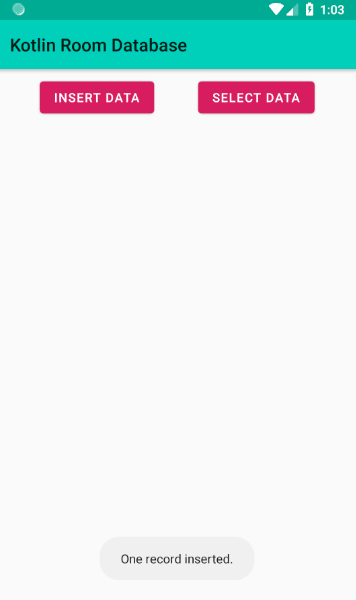
MainActivity.kt
package com.cfsuman.jetpackexamples

import androidx.appcompat.app.AppCompatActivity
import android.os.Bundle
import android.text.method.ScrollingMovementMethod
import kotlinx.android.synthetic.main.activity_main.*
import org.jetbrains.anko.doAsync
import org.jetbrains.anko.toast
import org.jetbrains.anko.uiThread
import java.util.*


class MainActivity : AppCompatActivity() {

    private lateinit var mDb:RoomSingleton
    private val mRandom:Random = Random()

    override fun onCreate(savedInstanceState: Bundle?) {
        super.onCreate(savedInstanceState)
        setContentView(R.layout.activity_main)

        // Initialize the room database
        mDb = RoomSingleton.getInstance(applicationContext)

        // Make the text view scrollable
        textView.movementMethod = ScrollingMovementMethod()

        // Insert button click listener
        btnInsert.setOnClickListener{
            // Initialize a new student
            val student = Student(id = null,
                    fullName = UUID.randomUUID().toString(),
                    result = mRandom.nextInt(100)
            )

            doAsync {
                // Put the student in database
                mDb.studentDao().insert(student)

                uiThread {
                    toast("One record inserted.")
                }
            }
        }


        // Select button click listener
        btnSelect.setOnClickListener{
            doAsync {
                // Get the student list from database
                val list = mDb.studentDao().allStudents()

                uiThread {
                    toast("${list.size} records found.")
                    // Display the students in text view
                    textView.text = ""
                    for (student in list){
                        textView.append("${student.id} : ${student.fullName} : ${student.result}\n")
                    }
                }
            }
        }
    }
}
activity_main.xml
<?xml version="1.0" encoding="utf-8"?>
<androidx.constraintlayout.widget.ConstraintLayout
    xmlns:android="http://schemas.android.com/apk/res/android"
    xmlns:app="http://schemas.android.com/apk/res-auto"
    xmlns:tools="http://schemas.android.com/tools"
    android:layout_width="match_parent"
    android:layout_height="match_parent"
    tools:context=".MainActivity">

    <Button
        android:id="@+id/btnInsert"
        android:layout_width="wrap_content"
        android:layout_height="wrap_content"
        android:layout_marginStart="8dp"
        android:layout_marginTop="8dp"
        android:layout_marginEnd="8dp"
        android:text="Insert Data"
        app:layout_constraintEnd_toStartOf="@+id/btnSelect"
        app:layout_constraintHorizontal_bias="0.5"
        app:layout_constraintStart_toStartOf="parent"
        app:layout_constraintTop_toTopOf="parent" />

    <Button
        android:id="@+id/btnSelect"
        android:layout_width="wrap_content"
        android:layout_height="wrap_content"
        android:layout_marginTop="8dp"
        android:layout_marginEnd="8dp"
        android:text="Select Data"
        app:layout_constraintEnd_toEndOf="parent"
        app:layout_constraintHorizontal_bias="0.5"
        app:layout_constraintStart_toEndOf="@+id/btnInsert"
        app:layout_constraintTop_toTopOf="parent" />

    <TextView
        android:id="@+id/textView"
        android:layout_width="0dp"
        android:layout_height="0dp"
        android:layout_marginStart="8dp"
        android:layout_marginTop="8dp"
        android:layout_marginEnd="8dp"
        android:layout_marginBottom="8dp"
        app:layout_constraintBottom_toBottomOf="parent"
        app:layout_constraintEnd_toEndOf="parent"
        app:layout_constraintStart_toStartOf="parent"
        app:layout_constraintTop_toBottomOf="@+id/btnInsert" />

</androidx.constraintlayout.widget.ConstraintLayout>
RoomSingleton.kt
package com.cfsuman.jetpackexamples

import androidx.room.Database
import androidx.room.Room
import androidx.room.RoomDatabase
import android.content.Context


@Database(entities = arrayOf(Student::class), version = 1)
abstract class RoomSingleton : RoomDatabase() {
    abstract fun studentDao():studentDao

    companion object {
        private var INSTANCE: RoomSingleton? = null
        fun getInstance(context: Context): RoomSingleton {
            if (INSTANCE == null) {
                INSTANCE = Room.databaseBuilder(
                        context,
                        RoomSingleton::class.java,
                        "roomdb")
                        .build()
            }
            return INSTANCE as RoomSingleton
        }
    }
}
RoomDao.kt
package com.cfsuman.jetpackexamples

import androidx.room.Dao
import androidx.room.Insert
import androidx.room.OnConflictStrategy
import androidx.room.Query

@Dao
interface studentDao{
    @Query("SELECT * FROM studentTbl")
    fun allStudents():List<Student>

    @Insert(onConflict = OnConflictStrategy.REPLACE)
    fun insert(student:Student)
}
RoomEntity.kt
package com.cfsuman.jetpackexamples

import androidx.room.ColumnInfo
import androidx.room.Entity
import androidx.room.PrimaryKey

@Entity(tableName = "studentTbl")
data class Student(
        @PrimaryKey
        var id:Long?,

        @ColumnInfo(name = "uuid")
        var fullName: String,

        @ColumnInfo(name = "result")
        var result:Int
)
build.gradle [app level]
apply plugin: 'com.android.application'
apply plugin: 'kotlin-android'
apply plugin: 'kotlin-android-extensions'
apply plugin: 'kotlin-kapt'


android {
    compileSdkVersion 28
    defaultConfig {
        applicationId "com.cfsuman.jetpackexamples"
        minSdkVersion 19
        targetSdkVersion 28
        versionCode 1
        versionName "1.0"
        testInstrumentationRunner "androidx.test.runner.AndroidJUnitRunner"
    }
    buildTypes {
        release {
            minifyEnabled false
            proguardFiles getDefaultProguardFile('proguard-android.txt'), 'proguard-rules.pro'
        }
    }
}


dependencies {
    implementation fileTree(dir: 'libs', include: ['*.jar'])
    implementation"org.jetbrains.kotlin:kotlin-stdlib-jdk7:$kotlin_version"
    implementation 'androidx.appcompat:appcompat:1.0.0-beta01'
    implementation 'androidx.constraintlayout:constraintlayout:1.1.2'
    testImplementation 'junit:junit:4.12'
    androidTestImplementation 'androidx.test:runner:1.1.0-alpha3'
    androidTestImplementation 'androidx.test.espresso:espresso-core:3.1.0-alpha3'

    // Material components
    implementation 'com.google.android.material:material:1.0.0-beta01'

    // Room database
    def room_version = "2.0.0-beta01"
    implementation "androidx.room:room-runtime:$room_version"
    annotationProcessor "androidx.room:room-compiler:$room_version"
    kapt 'androidx.room:room-compiler:2.0.0-beta01'

    // Android KTX
    implementation 'androidx.core:core-ktx:1.0.0-beta01'

    // Anko Commons
    implementation "org.jetbrains.anko:anko-commons:0.10.5"
}