MainActivity.kt
package com.cfsuman.kotlintutorials

import android.graphics.Color
import android.os.Bundle
import android.text.method.ScrollingMovementMethod
import android.util.TypedValue
import android.widget.Button
import android.widget.TextView
import androidx.appcompat.app.AppCompatActivity


class MainActivity : AppCompatActivity() {
    private lateinit var textView:TextView

    override fun onCreate(savedInstanceState: Bundle?) {
        super.onCreate(savedInstanceState)
        setContentView(R.layout.activity_main)

        // get the widgets reference from XML layout
        textView = findViewById(R.id.textView)
        val button = findViewById<Button>(R.id.button)
        val button2 = findViewById<Button>(R.id.button2)
        val button3 = findViewById<Button>(R.id.button3)
        val button4 = findViewById<Button>(R.id.button4)
        val button5 = findViewById<Button>(R.id.button5)


        // make textview content scrollable
        textView.movementMethod = ScrollingMovementMethod()


        // Test function with optional parameter and default value
        button.setOnClickListener{
            showMessage("Hello Android Development!")
        }


        // Here we pass value to optional parameter
        button2.setOnClickListener{
            showMessage("Hello New Color!", Color.BLUE)
        }


        // Here we calling function using parameter name
        button3.setOnClickListener{
            showMessage(message = "Hello Parameter Name!",
                color = Color.MAGENTA)
        }


        // Here we calling a function which have multiple
        // optional parameters and values
        button4.setOnClickListener{
            styledMessage(message = "Hello styled message!",
                textColor = Color.WHITE,bgColor = Color.DKGRAY)
        }


        // Here we calling a function which have multiple
        // optional parameters and values
        // We calling this function using parameter name
        // and we break parameter sequence
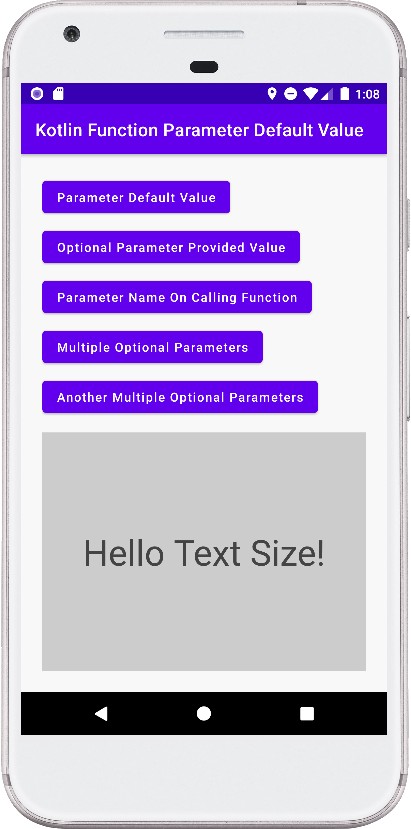
        button5.setOnClickListener{
            styledMessage(message = "Hello Text Size!",
                textSize = 40F,bgColor = Color.LTGRAY)
        }
    }


    // Function optional parameter and default value
    private fun showMessage(message:String, color:Int = Color.RED): Unit{
        textView.text = message
        textView.setTextColor(color)
    }


    // Function with multiple optional parameters and default values
    private fun styledMessage(message: String, textColor:Int=Color.DKGRAY,
                      bgColor:Int = Color.YELLOW, textSize:Float = 25F){
        textView.text = message;
        textView.setTextColor(textColor)
        textView.setBackgroundColor(bgColor)
        textView.setTextSize(TypedValue.COMPLEX_UNIT_SP,textSize)
    }
}
activity_main.xml
<?xml version="1.0" encoding="utf-8"?>
<androidx.constraintlayout.widget.ConstraintLayout
    xmlns:android="http://schemas.android.com/apk/res/android"
    xmlns:app="http://schemas.android.com/apk/res-auto"
    xmlns:tools="http://schemas.android.com/tools"
    android:layout_width="match_parent"
    android:layout_height="match_parent"
    android:background="#F8F8F8"
    android:padding="24dp">

    <Button
        android:id="@+id/button"
        android:layout_width="wrap_content"
        android:layout_height="wrap_content"
        android:text="Parameter Default Value"
        android:textAllCaps="false"
        app:layout_constraintStart_toStartOf="parent"
        app:layout_constraintTop_toTopOf="parent" />

    <Button
        android:id="@+id/button2"
        android:layout_width="wrap_content"
        android:layout_height="wrap_content"
        android:layout_marginTop="8dp"
        android:text="Optional Parameter Provided Value"
        android:textAllCaps="false"
        app:layout_constraintStart_toStartOf="parent"
        app:layout_constraintTop_toBottomOf="@+id/button" />

    <Button
        android:id="@+id/button3"
        android:layout_width="wrap_content"
        android:layout_height="wrap_content"
        android:layout_marginTop="8dp"
        android:text="Parameter Name On Calling Function"
        android:textAllCaps="false"
        app:layout_constraintStart_toStartOf="parent"
        app:layout_constraintTop_toBottomOf="@+id/button2" />

    <Button
        android:id="@+id/button4"
        android:layout_width="wrap_content"
        android:layout_height="wrap_content"
        android:layout_marginTop="8dp"
        android:text="Multiple Optional Parameters"
        android:textAllCaps="false"
        app:layout_constraintStart_toStartOf="parent"
        app:layout_constraintTop_toBottomOf="@+id/button3" />

    <Button
        android:id="@+id/button5"
        android:layout_width="wrap_content"
        android:layout_height="wrap_content"
        android:layout_marginTop="8dp"
        android:text="Another Multiple Optional Parameters"
        android:textAllCaps="false"
        app:layout_constraintStart_toStartOf="parent"
        app:layout_constraintTop_toBottomOf="@+id/button4" />

    <TextView
        android:id="@+id/textView"
        android:layout_width="0dp"
        android:layout_height="0dp"
        android:layout_marginTop="16dp"
        android:fontFamily="sans-serif"
        android:textSize="24sp"
        android:gravity="center"
        app:layout_constraintBottom_toBottomOf="parent"
        app:layout_constraintEnd_toEndOf="parent"
        app:layout_constraintStart_toStartOf="parent"
        app:layout_constraintTop_toBottomOf="@+id/button5" />

</androidx.constraintlayout.widget.ConstraintLayout>