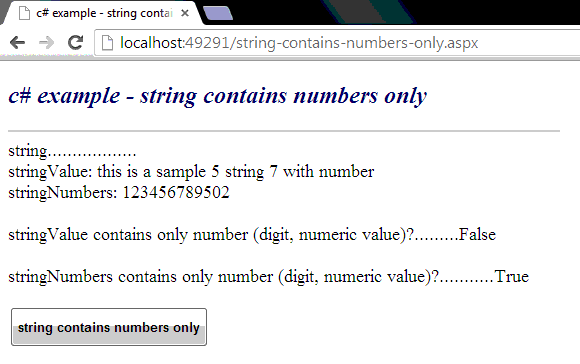
Check whether a String contains numbers only
The String represents text as a sequence of UTF-16 code units. The
String is a sequential collection of characters that is used to represent
text. The String is a sequential collection of System.Char objects.
The following .net c# tutorial code demonstrates how we can determine whether a String instance contains numbers only. So, in this .net c# tutorial code we will determine whether a String object’s all characters are digits/numbers or not.
The Enumerable All() method determines whether all elements of a sequence satisfy a condition. So using the Enumerable All() method we can check all the characters of a String instance are digits or not. If all the characters of the String object are digits then we can determine that the String instance contains numbers only.
The Enumerable All() returns a Boolean value. It returns true if every element of the source sequence passes the test in the specified predicate, or if the sequence is empty otherwise this method returns false.
The Enumerable All() method throws ArgumentNullException if the source or predicate is null. So, finally using this Enumerable All() method we can determine whether a String contains numbers only or not.
The following .net c# tutorial code demonstrates how we can determine whether a String instance contains numbers only. So, in this .net c# tutorial code we will determine whether a String object’s all characters are digits/numbers or not.
The Enumerable All() method determines whether all elements of a sequence satisfy a condition. So using the Enumerable All() method we can check all the characters of a String instance are digits or not. If all the characters of the String object are digits then we can determine that the String instance contains numbers only.
The Enumerable All() returns a Boolean value. It returns true if every element of the source sequence passes the test in the specified predicate, or if the sequence is empty otherwise this method returns false.
The Enumerable All() method throws ArgumentNullException if the source or predicate is null. So, finally using this Enumerable All() method we can determine whether a String contains numbers only or not.
string-contains-numbers-only.aspx
<%@ Page Language="C#" AutoEventWireup="true"%>

<!DOCTYPE html>
<script runat="server">
    protected void Button1_Click(object sender, System.EventArgs e)
    {
        //this section create string variables.
        string stringValue = "this is a sample 5 string 7 with number";
        string stringNumbers = "123456789502";

        Label1.Text = "string..................<br />";
        Label1.Text += "stringValue: " + stringValue;
        Label1.Text += "<br />stringNumbers: " + stringNumbers;

        //this line check string contains only digit/numeric value/number or not.
        Boolean isNumeric = stringValue.All(char.IsDigit);

        //this line check string contains only digit/numeric value/number or not.
        Boolean isNumeric2 = stringNumbers.All(char.IsDigit);

        Label1.Text += "<br /><br />stringValue contains only number (digit, numeric value)?.........";
        Label1.Text += isNumeric.ToString();

        Label1.Text += "<br /><br />stringNumbers contains only number (digit, numeric value)?...........";
        Label1.Text += isNumeric2.ToString();
    }
</script>

<html xmlns="http://www.w3.org/1999/xhtml">
<head id="Head1" runat="server">
    <title>c# example - string contains numbers only</title>
</head>
<body>
    <form id="form1" runat="server">
    <div>
        <h2 style="color:MidnightBlue; font-style:italic;">
            c# example - string contains numbers only
        </h2>
        <hr width="550" align="left" color="Gainsboro" />
        <asp:Label
            ID="Label1"
            runat="server"
            Font-Size="Large"
            >
        </asp:Label>
        <br /><br />
        <asp:Button
            ID="Button1"
            runat="server"
            Text="string contains numbers only"
            OnClick="Button1_Click"
            Height="40"
            Font-Bold="true"
            />
    </div>
    </form>
</body>
</html>